ADVISOR GUIDE · UNIVERSAL VACATIONS
A Universal travel advisor workflow that stays organized
A Universal travel advisor workflow should connect a family’s priorities to the proposal, verified reservations and client handoff. Universal Orlando and Universal Studios Hollywood need separate destination notes. A combined Disney and Universal vacation also needs clear hotel, park and transfer dates, with one advisor responsible for each next step.
The short answer
A repeatable Universal travel agency workflow collects full party details, destination and park mix, location and transportation priorities, resort and room preferences, quote options, verified supplier details, payment obligations, itinerary documents and advisor follow-up tasks.
Next in this workflow
Capture dates, the full family, budget inclusions and destination priorities before preparing the first comparison. Start with the free client intake questionnaire
By Mac Hance · Travel advisor and founder of Itinistry · Updated November 10, 2026. Independent advisor guidance; verify current supplier terms.
Questions that clarify the right Universal vacation
Start the Universal planning conversation with the destination, full party, dates, room needs and priorities. Ask how the family wants to divide its time, what transportation trade-offs it accepts and which details still need confirmation. Keep the answers in the trip record so the proposal reflects the family’s actual needs.
Itinistry tools for this workflow
Discovery: define the vacation before comparing hotels
Confirm whether the family means Universal Orlando in Florida or Universal Studios Hollywood in California. Record the full travel party, ages at travel, date flexibility and room layout requirements. Ask about pace, rest time, transport, accessibility requests and the budget components the client expects to include. For a combined vacation, map which nights and park plans belong to each destination. Do not carry an Orlando hotel assumption or benefit into a Hollywood proposal simply because both trips include Universal.
Comparison: show the complete cost and evidence
A Universal comparison should separate accommodation, tickets, transfers and any quoted extras. Name the supplier, quote date, included products and unresolved questions. Check the specific admission and hotel terms before treating a benefit as included. If the client asks about Express access, record the exact product, dates and restrictions being compared rather than using a generic yes/no label. Resort category, a copied description or a prior client’s reservation is not sufficient evidence for a new booking.
Reservation: turn verified details into owned tasks
After the client selects an option, verify the current availability and price through the authorized supplier channel. Record the confirmation, traveler names, selected products, payment schedule and cancellation conditions. Attach a source to each deadline and assign the responsible advisor. Keep client requests separate from supplier-confirmed arrangements. A CRM entry can document the booking process, but entering a confirmation number does not independently validate the supplier’s reservation or make a new one. Use Itinistry’s advisor workflow tools to organize the trip stage, responsible advisor and next actions.
Client handoff: publish the plan the family will use
Prepare the itinerary as a private draft, with reviewed hotel dates, park plans, transport details and relevant documents. Preview the traveler portal and PDF before sharing. Keep unresolved comparisons, internal commission figures and advisor-only notes private. Identify what the client needs to do next and how to contact the advisor about a change. Sharing the plan should make the family’s next action clear without suggesting that unconfirmed requests or estimated costs have become guaranteed arrangements.
How advisors use this workflow
1. Qualify a fictional split-stay inquiry
During a workflow test, use two adults and two children planning four Universal nights after another destination. Give the family a room-layout preference, a rest-day request and a transfer question. Record the arrival and departure dates once, then check that the proposal and itinerary use the same trip context. The test should reveal whether preferences, decisions and open questions remain attached to the family or have to be retyped into separate tools.
2. Compare two complete, clearly labeled options
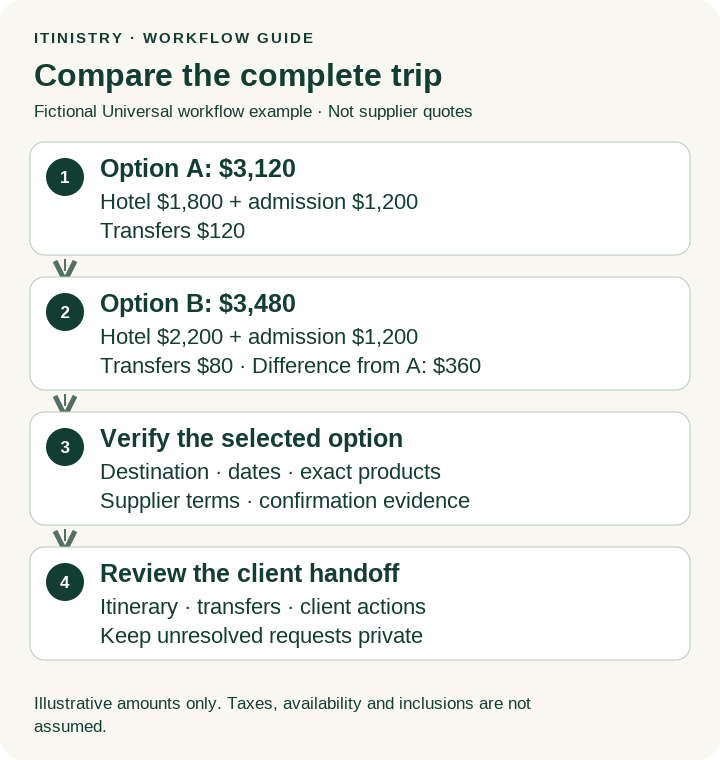
Illustrative figures only: option A has $1,800 in accommodation, $1,200 in admission and $120 in transfers, totaling $3,120. Option B has $2,200 in accommodation, $1,200 in admission and $80 in transfers, totaling $3,480. The difference is $360. These are not live supplier quotes and make no claim about taxes, availability or inclusions. Use the example to test whether the CRM preserves each cost component, the reason for recommending an option and the family’s recorded choice.
3. Review changes across both parts of the vacation
If the family changes a hotel night, check the transfer date, ticket plans, room fit, quoted extras and every reservation-specific deadline that may be affected. Preserve the original decision and record the new request. Assign unresolved supplier questions before updating client-visible content. A combined Disney and Universal plan should not silently move dates in only one destination. Review the final handoff against the latest supplier confirmations, including any separate reservations or independently purchased products.
4. Close the trip with a complete operations record
Before travel, confirm that the itinerary, documents and open tasks agree and that each follow-up has an owner. Record which items were reviewed and which require the traveler to act. After the trip, save feedback and the next relationship task. Track expected supplier commission separately from remittances and advisor payouts. A trip marked complete is a planning status; the commission ledger should not show paid until the supplier receipt and any required payout review support that status. Continue the financial follow-through with Itinistry’s commission tracking tools, keeping expected amounts distinct from recorded receipts.
Who benefits
- Universal Orlando specialists
- Universal Studios Hollywood planners
- Combined Disney and Universal advisors
Questions travel advisors ask
Does Universal planning require a different CRM from Disney planning?
The client, proposal and follow-up process can use one CRM, while destination-specific information stays distinct. Universal Orlando, Universal Studios Hollywood and Disney products have different supplier terms and planning contexts. An advisor should be able to reuse the operating process without copying a benefit, deadline or reservation assumption between destinations.
How should an advisor compare a split-stay itinerary?
When comparing a split-stay itinerary, travel advisors should compare the total quoted cost, room configuration, destination dates, transfers, extra travel time and the client’s priorities. Keep separate supplier confirmations linked to the same trip. Check that a proposed date change updates the review tasks for every affected part of the vacation before publishing a revised itinerary.
Can an advisor assume Express access is included with a hotel?
A Universal hotel booking does not by itself establish that Express access is included. Travel advisors should check the exact hotel, admission product, travel dates and current supplier terms for the reservation under review. Record the supporting source and any restrictions. An option should remain unconfirmed when the required evidence is missing; the CRM should not convert an advisor’s assumption into a guaranteed inclusion.
What should the traveler receive before departure?
The traveler should receive the advisor-approved itinerary, relevant booking documents, confirmed dates, reviewed transport details and a clear list of any remaining client actions. Keep private comparison notes, internal financial details and unreviewed drafts out of the shared portal and PDF. Verify that the shared material belongs to the correct family.
Related advisor software and guides
- Travel advisor post-booking checklist: confirmation to client handoff
- Universal travel agent software for confident, organized trips
- Disney and Universal trip planning in one connected advisor workflow
- Travel proposal software that keeps every decision connected
- Travel agent client intake template
- Free travel agent templates, checklists and workflow guides
Primary sources for the Universal trip handoff
Universal supplies the park preparation guidance. The FAA supplies a separate flight-document check when air travel is part of the family vacation. Neither source endorses Itinistry.
Universal Orlando’s official preparation page covers the traveler’s account, ticket linking and park app. Add the relevant account and ticket checks to the client handoff after reviewing the family’s confirmed products. Review Universal Orlando’s preparation steps
The FAA advises families to contact the airline about identification policies for minors before travel. For a Universal trip that includes flights, assign the airline-document check separately from the park and hotel confirmation tasks. Review the FAA’s family flight guidance
Put your advisor workflow into practice.
Explore how client details, proposals and follow-ups stay connected in Itinistry. The tour uses a fictional family trip to show the workflow.
No account needed. Explore the demo with sample data.
Try the advisor workflow demo · Start your 14-day free trial