ADVISOR GUIDE · DISNEY WORKFLOWS
A practical Disney travel agent CRM checklist
A Disney travel advisor’s CRM should make the next step clear for each family. Keep party details, proposal decisions, verified reservations and follow-ups attached to the correct trip. Use this checklist to review a Walt Disney World, Disneyland or Disney Cruise Line workflow before you move active client work into a new system.
The short answer
A Disney-focused travel agent CRM should track client identity, party members and ages, dates, preferences, accessibility considerations, proposal options, supplier-confirmed booking details, actual deposit and final-payment deadlines, client documents, communication history and expected commissions. It should separate advisor-only data from traveler-facing information.
Next in this workflow
Capture dates, the full family, budget inclusions and destination priorities before preparing the first comparison. Start with the free client intake questionnaire
By Mac Hance · Travel advisor and founder of Itinistry · Updated October 29, 2026. Independent advisor guidance; verify current supplier terms.
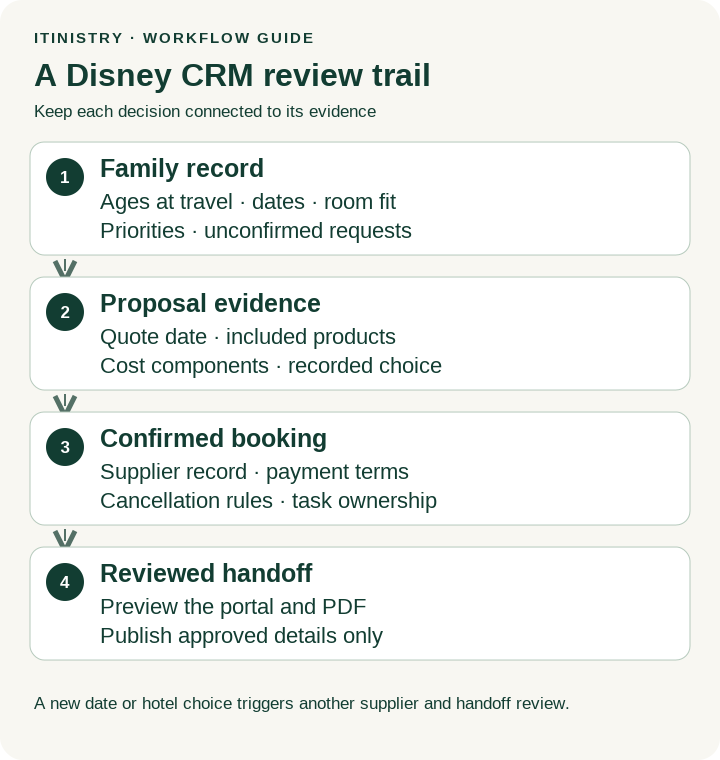
The lead-to-departure checklist
Use the Disney CRM checklist as an operations review, with a named advisor, an evidence record and a clear handoff at every stage. Supplier policies belong in the source record for that specific reservation. A generic countdown or an old quote cannot establish a family’s current booking terms.
Itinistry tools for this workflow
1. Capture the family and the right destination
Record each traveler’s first name, age at travel, requested dates, room needs and priorities. Keep Walt Disney World, Disneyland and Disney Cruise Line as distinct trip contexts. Ask about mobility, dietary requests, rest breaks and transportation only to the extent needed for planning. Mark a request as unconfirmed until the relevant supplier has accepted it. Record the client’s preferred contact route and what the agency is permitted to send. Give the inquiry an assigned advisor and a dated next step before preparing a proposal.
2. Compare options against the family’s priorities
A Disney proposal should explain why each option fits the recorded family. Compare room configuration, location, transportation, park plans and the complete quoted cost, including stated inclusions and exclusions. Keep the supplier, quote date and validity beside the amount. In a fictional comparison, a family may consider a $4,200 option and a $4,800 option because the latter reduces transfers. The $600 difference is a conversation about priorities, not proof that the higher price is better. These figures are illustrative and are not supplier rates or bookable offers.
3. Verify the reservation before creating deadlines
Record the supplier confirmation, selected product, named travelers, travel dates, deposit and final-payment obligations. Separate an advisor’s estimate from a supplier-confirmed reservation. Verify the cancellation terms and any eligibility-dependent benefits against the current booking evidence. A Walt Disney World hotel stay, a Disneyland package and a Disney cruise can have different conditions. Create calendar tasks from the reservation being managed, with the responsible advisor and source attached. Do not copy one product’s deadline into another trip just because both carry the Disney name.
4. Separate private preparation from the client handoff
Keep internal comparison notes, unresolved questions and draft itinerary items private. Publish only reviewed details the traveler should use: confirmed dates, approved itinerary content, relevant documents and the next client action. Preview the client portal and branded PDF before sharing. Check which changes require a new client message and which remain an internal task. A published itinerary is a communication record; it is not confirmation that a supplier reservation has been made. Assign a post-trip follow-up and keep commission reconciliation separate from the traveler-facing plan.
How advisors use this workflow
1. Move an inquiry into a usable client record
Start with a fictional family during a CRM evaluation. For example, two adults and children aged 8 and 11 want a quieter resort, midday breaks and a trip within a defined budget. Capture those priorities once, then check that the assigned advisor can find them while preparing options. A complete handoff includes the family’s open questions, the next action and its due date. Avoid scattering the same preferences across a form, an email and a separate spreadsheet.
2. Preserve the proposal decision
When a family chooses an option, record what was selected, when the decision was received and what still needs supplier verification. Keep the alternatives available for context. If the client replies with a change by email, attach the decision to the correct trip rather than leaving the only record in a mailbox. Before treating an option as booked, verify the current price, availability, traveler details and supplier terms through the authorized booking channel.
3. Recheck the trip when dates or party details change
A date change can affect ages at travel, room requirements, transport plans, quoted options and reservation-specific milestones. Keep the original decision in the history and record the requested change separately. Reconfirm the supplier evidence before updating deadlines. Review any previously approved proposal or itinerary content that depends on the old dates. The advisor should know which items are still drafts, which have been published and which client communications remain to be sent.
4. Use an acceptance check before departure and after travel
Before sharing the final trip plan, confirm that every open task has an owner, each client-visible document belongs to the right family and the itinerary matches the latest reviewed reservations. Ask another authorized teammate to review the handoff if the agency’s process calls for it. After travel, record feedback and the next relationship task. Reconcile supplier commission against the remittance and actual receipt; a completed vacation alone does not establish that the agency has been paid.
Who benefits
- New Disney travel advisors
- Experienced family-vacation specialists
- Agency owners creating standard operating procedures
Questions travel advisors ask
What fields matter most in Disney vacation intake?
Disney vacation intake should record the full party and ages at travel, destination, dates, room needs, budget priorities and the family’s own must-do experiences. Keep planning requests separate from confirmed supplier arrangements. A clear client record also names the assigned advisor, unresolved questions and the next follow-up date.
Should every Disney family receive the cheapest option?
A Disney proposal should compare the complete quoted cost and the priorities the family has stated. Room fit, transport, resort location and time spent moving around can matter alongside price. Explain the trade-off using verified options, then preserve the client’s choice rather than assuming that the least expensive or most expensive option is the right one.
When should final-payment reminders be created?
Create a final-payment reminder after checking the applicable deadline on the actual supplier reservation. Attach the evidence, responsible advisor and required client action. Recheck the task when the booking changes. A date copied from another family’s trip or a different Disney product is not sufficient evidence.
What should stay out of a traveler-facing itinerary?
Keep private advisor notes, internal financial details, unreviewed estimates and draft planning options out of the client handoff. Publish only the itinerary items and documents the advisor has approved for that trip. Preview the traveler view and PDF using the latest reservation details before sharing the link.
Related advisor software and guides
Official supplier planning references
Official Walt Disney World and Disneyland Resort planning references help travel advisors verify current supplier guidance. The reference links do not imply an affiliation with Itinistry.
See a connected trip record in action.
Follow a sample family trip from client details to planning tasks and the client portal in Itinistry.
No account needed. Explore the demo with sample data.